

The carbon cost of website weight
Websites aren't weightless. Every byte transferred requires energy for transmission and storage. According to 2023 data from Sustainable Web Design, an average page view generates roughly 0.49g of CO2. When you multiply that by thousands of visitors, a heavy site becomes a measurable environmental liability.
This might not sound like much for a single page view, but consider the sheer scale of the internet. Billions of websites are visited daily, and that number is increasing. Data centers, which power these websites, are enormous energy consumers. The growth of the internet population only exacerbates the problem. We're creating more data, requiring more servers, and ultimately, using more energy.
The environmental cost of our digital habits is becoming increasingly apparent. We need to start thinking critically about how we build and maintain websites, prioritizing efficiency and minimizing our collective carbon footprint. Ignoring this issue isn't an option; it’s a responsibility we all share. A heavier website isn’t just slower, it’s demonstrably worse for the planet.

How SVGs cut data waste
Scalable Vector Graphics (SVG) reduce weight because they are math-based rather than pixel-based. While a JPEG stores data for every individual pixel, an SVG uses coordinates to draw lines and shapes. For logos and icons, this usually results in a file that is a fraction of the size of a PNG.
Think about a company logo. Recreating it as a raster image requires defining the color of each individual pixel. An SVG, on the other hand, describes the logo as a series of lines, curves, and shapes. This mathematical description is far more compact. Beyond file size, SVGs are infinitely scalable without any loss of quality. Raster images become pixelated when enlarged, but an SVG remains crisp and clear at any resolution.
While not a universal replacement for all images, SVG is a compelling choice when appropriate. Prioritizing SVG where it makes sense is a straightforward way to contribute to eco-friendly web development and improve website performance.
Raster vs. Vector: A Size Comparison
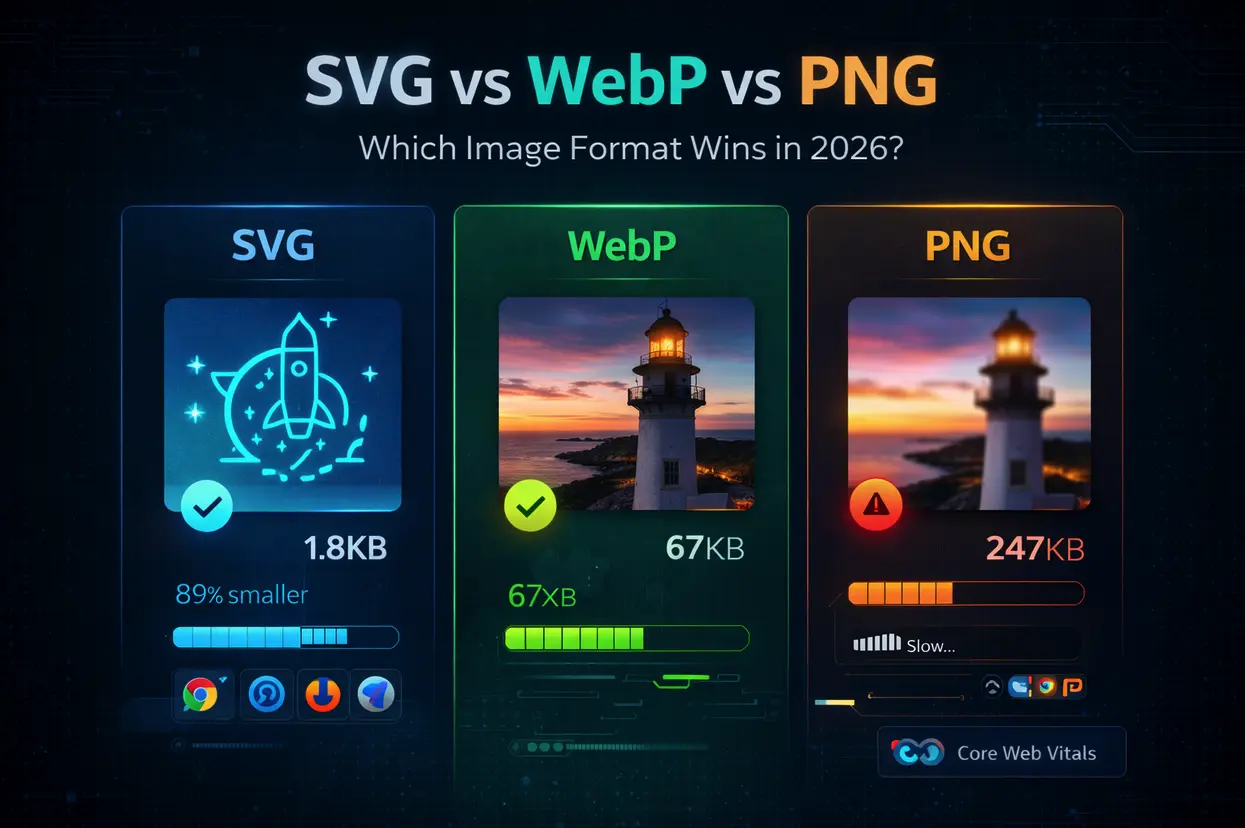
Let’s look at some concrete examples. Imagine a simple logo—a stylized leaf—rendered in both PNG and SVG formats. The PNG version, even optimized, might be around 10-20 kilobytes. The equivalent SVG version could be as small as 1-3 kilobytes. That's a substantial difference, especially when you consider that many websites use dozens or even hundreds of these small graphics.
The advantage of SVG is most pronounced with simpler graphics. Logos, icons, illustrations, and even basic charts are ideal candidates for SVG conversion. However, raster images are still necessary for photographs and complex images with subtle gradients and textures. Trying to represent a photograph as an SVG would result in a massive, unwieldy file.
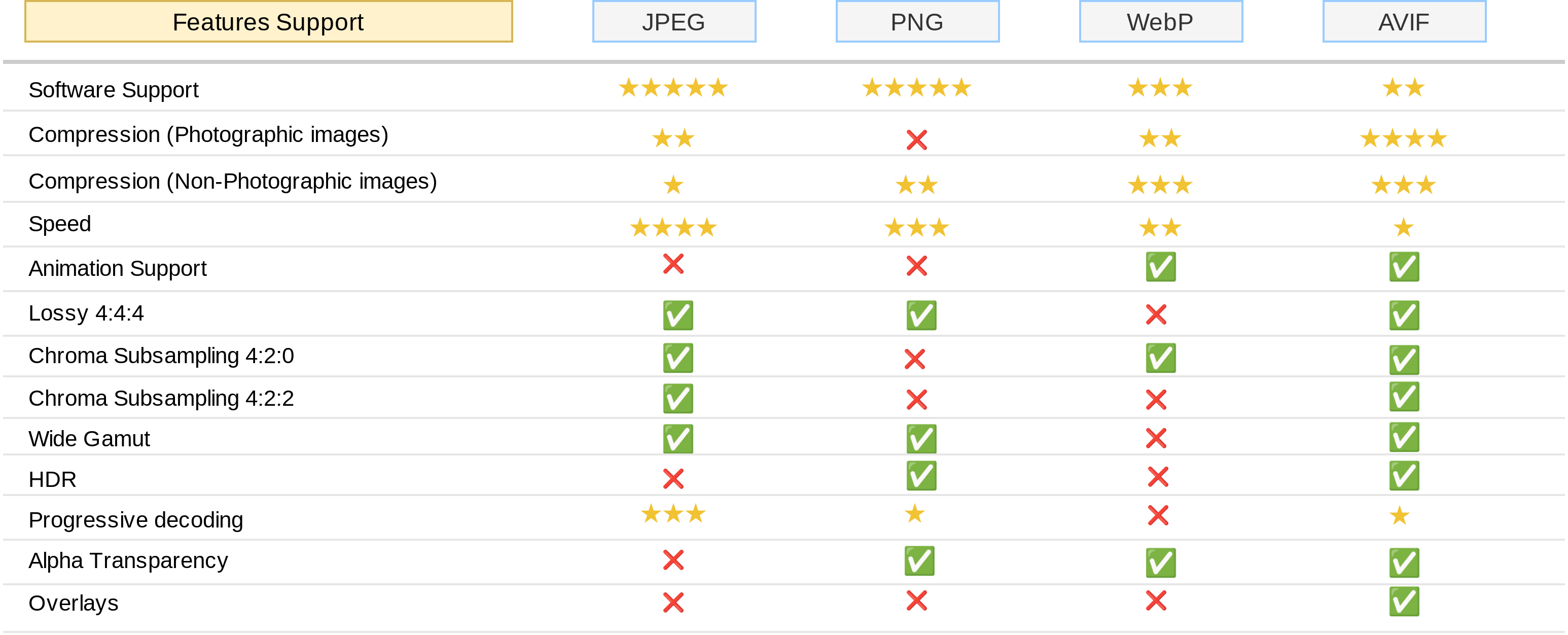
It’s about choosing the right tool for the job. SVG isn’t about eliminating raster images entirely, it’s about intelligently selecting the most efficient format for each asset. A good rule of thumb is: if it’s a simple shape or graphic, SVG is likely the better choice. If it's a photograph, stick with a well-optimized JPEG or WebP.
- Logos are almost always smaller as SVGs.
- Icons stay sharp at any size without adding extra bytes.
- Illustrations: Simple illustrations benefit greatly from SVG.
- Photographs: Raster formats (JPEG, WebP) are essential.
- Complex Graphics: Raster may be more practical due to file size concerns.
When to Use SVG vs. Raster
| Graphic Type | SVG Recommended? | Raster Recommended? | Notes |
|---|---|---|---|
| Logos | Yes | No | SVGs scale perfectly without loss of quality, ensuring a crisp logo on any device. Vector format results in smaller file sizes for simple logos. |
| Icons | Yes | No | Similar to logos, icons benefit greatly from SVG's scalability and small file size. This is particularly important for numerous icons on a page. |
| Illustrations | Often | Sometimes | Simple illustrations with flat colors are ideal for SVG. More complex illustrations *can* be SVG, but file sizes may become large. Consider raster for highly detailed illustrations. |
| Photographs | No | Yes | Photographs are inherently raster images. Attempting to convert them to SVG generally results in extremely large, inefficient files. JPEG, PNG, or WebP are better choices. |
| Complex Artwork | Potentially | Often | Artwork with gradients, shadows, and many details can be challenging for SVG. Raster formats may provide better visual fidelity and smaller file sizes in these cases. |
| Charts/Graphs | Yes | Sometimes | Data visualizations like charts and graphs are well-suited to SVG, allowing for interactive elements and easy updates. Raster formats are suitable for static charts. |
Illustrative comparison based on the article research brief. Verify current pricing, limits, and product details in the official docs before relying on it.
Speed and SEO benefits
The benefits of using SVG extend beyond just reducing your website’s carbon footprint. Smaller file sizes directly translate to faster loading times. When a user visits your website, their browser has to download all the assets—images, scripts, stylesheets—before it can display the page. SVG’s compact size means less data needs to be downloaded, resulting in a quicker initial load.
Speed is a basic requirement. If a page takes longer than three seconds to load, bounce rates spike. Since Google uses page speed as a ranking signal, swapping heavy PNGs for SVGs is one of the fastest ways to help your search position while keeping the site lean.
Furthermore, SVG can be animated and made interactive directly within the browser, often without the need for bulky JavaScript libraries. This reduces the amount of code that needs to be downloaded and executed, further improving performance. SVG isn't just a sustainable choice; it’s a smart one.
Optimizing SVGs for Maximum Impact
Simply switching to SVG isn’t enough. You need to optimize your SVG files to ensure they are as small and efficient as possible. One common issue is unnecessary metadata. SVGs can contain information about the software used to create them, which adds to the file size. Tools like SVGO (SVG Optimizer) automatically remove this metadata.
Minimizing path data is another important step. SVG paths are defined by a series of coordinates. Simplifying these paths—reducing the number of points—can significantly reduce file size without noticeably affecting the visual quality. Efficient color palettes are also key. Using fewer colors can reduce the complexity of the SVG and its overall size.
Several online SVG compressors can help with optimization. These tools typically combine multiple optimization techniques into a single, easy-to-use interface. Regularly optimizing your SVGs is a simple but effective way to maximize their environmental and performance benefits. Don’t just create an SVG, optimize it.
Accessibility wins
Sustainable web design and inclusive design go hand-in-hand. SVG’s text-based nature offers a significant accessibility advantage over raster images. Screen readers, used by people with visual impairments, can interpret the text within an SVG file and provide a description of the image. Raster images, on the other hand, require alternative text (`alt` attributes) to be accessible.
However, simply using SVG isn't enough. It’s important to use `aria-label` attributes and descriptive `title` tags within your SVGs. These tags provide additional context for screen readers, ensuring that users understand the purpose and meaning of the image. Proper use of these attributes makes your website more usable for everyone.
By prioritizing SVG and incorporating accessibility best practices, you’re not only reducing your website’s environmental impact but also creating a more inclusive digital experience. It's a win-win situation.
SVG in Popular Frameworks (2026 Outlook)
SVG integrates seamlessly with popular web development frameworks like React, Vue, and Angular. These frameworks typically provide mechanisms for importing and rendering SVG files as components. In React, for example, you can import an SVG file directly into your code and use it as a React component.
Looking ahead to 2026, I anticipate continued improvements in SVG support within these frameworks. We might see more sophisticated tools for optimizing SVGs directly within the development workflow, as well as better integration with animation libraries. The trend towards component-based architectures will likely further encourage the use of SVG as a reusable and efficient graphic format.
The learning curve for incorporating SVG into these frameworks is relatively low. Most developers are already familiar with the concepts of components and vector graphics, so adopting SVG is a natural extension of their existing skillset. It’s unlikely to add significant complexity to the development process.

No comments yet. Be the first to share your thoughts!